Introduction
First read Chris Riesbeck’s Using Copilot as well as the rest of the notes on using gen ai: Gen AI Notes.
Setup the Project for the prototype
-
Use the react-typescript-vite template to create a new repository for your prototype.
-
open the project in VS Code. Insure CoPilot is enabled. Click the chat icon (see below) to the right of the project title; or from the menu select View->Open Chat.

-
open the co-pilot-instructions.md file in the
.githubfolder. You can customize this file with general instructions on how the AI will write code for you. -
Create a new markdown file in the
docsfolder for your vision and payoff picture. This is where you can share your vision and payoff picture with the AI as you are building your prototype. Chris Riesbeck has a good prototype prompt example. -
Prompt by referencing your vision file (you can add it to the chat or use
#to reference it. -
Add a picture of what you want your prototype to look like. You can use your four-panel payoff picture if you have one. Or you can draw a new picture on paper and take a photo of it. The key is to have something visual to share with the AI to help it understand what you want to build and how the different elements relate to each other. You can share the picture in the chat; or put in docs and reference using
#and the name of the file.
Student Copilot in 2026
Make sure you have VS Code and Student Copilot properly enabled. Review Setting Up VS Code for Software Engineering.
However, GitHub Student Copilot has changed and no longer offers access to all the models of Copilot Pro. It still works well, but Microsoft’s recommendation is to use the “auto” model mode. Auto has worked fine for me; and mostly as of this writing that seems to select Codex 5.2 which works well for our purposes. Here are the actual models that are available to students as of this writing: 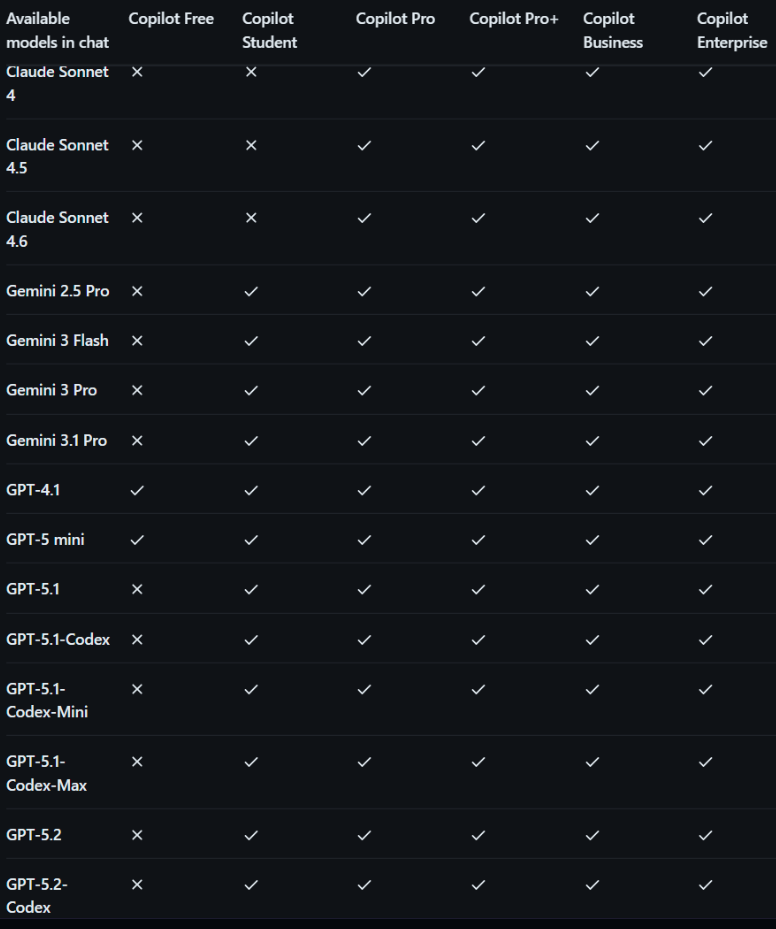
Chat Modes
Additionally, Edit mode has gone away. The three default chat modes are now:
- Chat. This is the default and most versatile mode. It allows you to have a conversation with the AI and ask it to generate code, explain code, or help you with any coding-related task. Usually I start here before moving to agent or plan.
- Agent This mode allows you to use the AI as an agent that can perform tasks on your behalf, such as running commands, editing files, or searching the web. You can give it instructions and it will try to execute them using the tools it has access to. This is a powerful mode that can help you automate complex workflows and get things done faster. This mode creates a plan and todo list and then chugs away on the codebase. This is a good prompt to use once you like your vision markdown the way you want it. I recommend using default permissions so you can see what tools and make a decision about whether to allow them or not.
- Plan This mode is designed to help you plan and organize your work. It allows you to create a plan for your project, break it down into tasks. You can chat to iterate on the plan before it begins. If the plan gets large; I recommend saving it in a file in your repository; and using a todo markdown to keep track of progress outside the context of the agent. It will only read your code and not make changes.
Managing the non-determinism of Gen AI
The key difference between Gen-AI and most other tools that have been used for software development is that it is non-deterministic. You never get the same output twice and it depends your prompting ‘alchemy’ and judgement on what you get. In fact Kent Beck from extreme programming calls it a ‘Genie’ because you have to be careful what you ask for and how you ask for it. The insight of the agentic tools introduced in the last year is to couple the non-deterministic generation with deterministic tools like file editing, testing, and version control to create a feedback loop that allows you to harness the power of Gen AI while mitigating its risks. So a few thoughts:
- Be as specific as you can in your prompting. A good strategy is often to iterate with the AI itself in chat mode to refine your prompt before you ask it to generate code. Plan mode in Copilot is great for this; but chat works as well; ask the model what else it needs or any decisions that need to be made before it can generate the code you want
- Use tools when possible Try not to ask the AI to do things that you can do with tools yourself. A good example is asking it to format code. The template includes Prettier and Lint fo this, so both you and the agent can use those tools to format code, and fix type bugs. The default copilot-instructions.md file in the template includes instructions to use these tools, but you may want to customize those instructions to fit your workflow and preferences. More strategies on using tools will be covered later in the course.
- A picture really is worth a thousand words (or tokens!). If you can find an example of what you want, or draw it yourself and share it with the AI, that can be a great way to communicate your intent and get better results. For example, on the prototype assignment when I did it I had much better results when I drew the component with a sharpie on a piece of paper and shared a picture of it with the AI, than when I just described it in words. Consider using your payoff picture from your four panel. Just put the jpg or png in the docs folder near the vision markdown and share that with the AI when you are asking it to generate code for your prototype.
- Don’t Trust but also Verify. You don’t know what you are going to get until you get it, and even then you have to evaluate if it is good or not. CoPilot can mess up a project fast! Git is your friend here. Commit early and often. Use branches. Look at the output. Every time I have something working and it seems like progress; I commit. Are the components getting large? tell it to split them and look through to give good guidance on how to split. Don’t understand something in the output? ask in the chat. Also while we will discuss testing more in the next few weeks; experiment with having unit tests written. Keep the prototype running after you get the first thing working (i.e. have
npm run devgoing and have the app open in a browser). Don’t like something? make a screen shot and ask about it. - Context. While it’s great to give the model a lot of detail; also consider what you want to keep in the model’s context window. As your chats get longer the tool forgets more of the early context. Break things into smaller chunks and use files as a way to store information for a long running plan. I’ve had good luck with it creating a todo list for a session and storing in in docs. Ask the model to check off what’s done and what’s left to do. The tools does this itself internally1; but it’s subject to the limits of the context window. It also helps me as a Human understand where I am in the process and what is left to do.
Tips for Better Prototypes
Some of these are also things that make a great four panel:
- have real data in your prompts and drawings. Don’t just say “a list of products with name, price, and image”. Instead, have a real list of products with real names, prices, and images that you can share with the AI. This will help it generate more realistic and relevant code.
- focus on the payoff or core value of your prototype. Get the results screen where you want it; then add the elements that build to it.
Ask Copilot to explain tradeoffs when it suggests architecture or package choices, and keep what is simplest for your current task. In general, if it suggests adding a package you don’t understand; go to the webpage of the package, read about it, and ask the AI to explain how it works and why it is useful. If you don’t understand or don’t need it, don’t add it. You can always add it later if you decide you need it. Remember YAGNI - You Ain’t Gonna Need It.
Things the AI is really good at that you should take advantage of:
- using git commands. It understands git really well and can help you better understand the git command line interface. Same with GitHub; it’s why I have you install the
ghCLI tools. - debugging npm errors and package conflicts. One thing to remember here is the core data in most AI models is not current. If a package is consistently giving you an error; it makes sense to do your own research by looking at the library and the versions you have (package.json and package-lock.json). Another tip is to paste the link to the documentation into the chat and ask the AI to look at it.
- writing commit messages and README’s. Two simple prompts I use a lot “examine the changes in git, write a commit message for me to review, and then commit the changes” and “write a README for this project based on the code and the vision markdown”. These can be great starting points that you can then edit and improve.
- working backwards from errors in the browser console. Paste them into chat and ask for help understanding them and fixing them.
Final Thoughts
The goal of the prototype is to learn how to use Gen AI tools to build software. Don’t worry about making it perfect or adding a lot of features. Focus on getting something working that demonstrates the core value of your idea, and then you can iterate and improve it later. The prototype is a learning experience, not a final product. Embrace the messiness and have fun with it!
Footnotes
-
It’s actually a little more complicated than this. The agentic tools have a working memory that is separate from the context window, and they use tools to store information in files or other places that they can access later. But the principle of using tools to manage context and state still applies. Most of the current releases also spawn sub-agents to do specific tasks, and those sub-agents have their own context windows and working memory, so it’s important to keep track of what information is where and how it flows between agents and tools. ↩
Resources
| Resource | Description |
|---|---|
| Chris Riesbeck's Using Copilot → | Initial reference for how to approach building with Copilot. |
| VS Code Setup Tutorial → | Set up VS Code and Student Copilot before starting your prototype. |
| Gen AI Notes → | Additional notes and guidance for using generative AI tools responsibly. |